Magic xpi Integration Scenario (Magic xpi 3.x)
The scenario below describes a particular integration scenario and how Magic xpi is used to solve the integration challenge. The particular example includes Magic xpi’s interaction with the IBM i platform.
The scenario shown below describes a typical integration situation leveraging ERP applications running on different platforms, a homegrown legacy application, and financial applications to a modern Web-based interface.
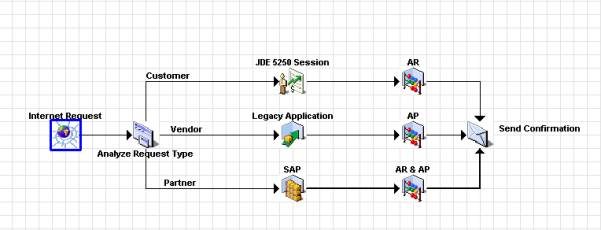
The scenario consists of these steps:
-
A request via the Web to a Magic xpi Server.
-
The Server categorizes the request as Customer, Vendor, or Partner.
-
Customer requests are directed to a JD Edwards 5250 application, running on an IBM i server, which updates the JD Edwards database. The company’s AR system, which runs on an IBM i server, is then updated and a confirmation email message is sent.
-
Vendor requests are directed to a homegrown legacy application, which runs on an IBM i server, that updates the vendor database. The company’s AP system, running on a Windows server, is then updated and a confirmation email message is sent.
-
Partner requests are directed to an SAP Business One® system, running on a “Wintel” server, that updates the SAP database. The company’s AP system running on a Windows server and the AR system running on an IBM i server are then updated and a confirmation email message is sent.
