How Do I Generate a Web Client Application? (Magic xpa 4.x)
To generate a Web Client application, follow the steps below:
-
Click on Web option of the Menu bar.
-
Click on Generate Web Application. This opens Generate Web Application dialog box as shown below:
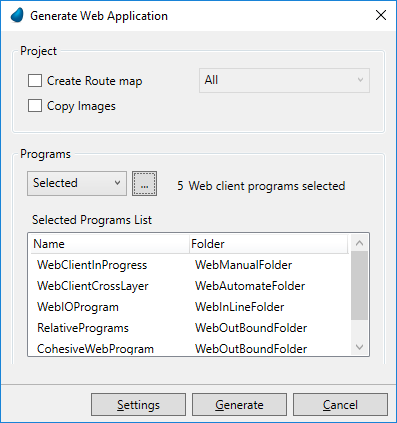
3. Select any option(s) from the Project Group:
4. Select an option from the Programs group.
5. Selected Programs List
Once you select the programs, you get to see the list of selected programs in this list box.
6. Click on Generate button. Your application will be generated at the Web Application Folder that you specified in the Web
Generation Settings.
7. Click on Cancel to cancel the generation process.
